Making a health insurance plan readable in five seconds
The insurer already knew what your plan covers and what you had spent, but it lived in a system built for insurance staff. This is the page that turns those raw records into the two answers people actually want: what am I covered for, and how much is left.
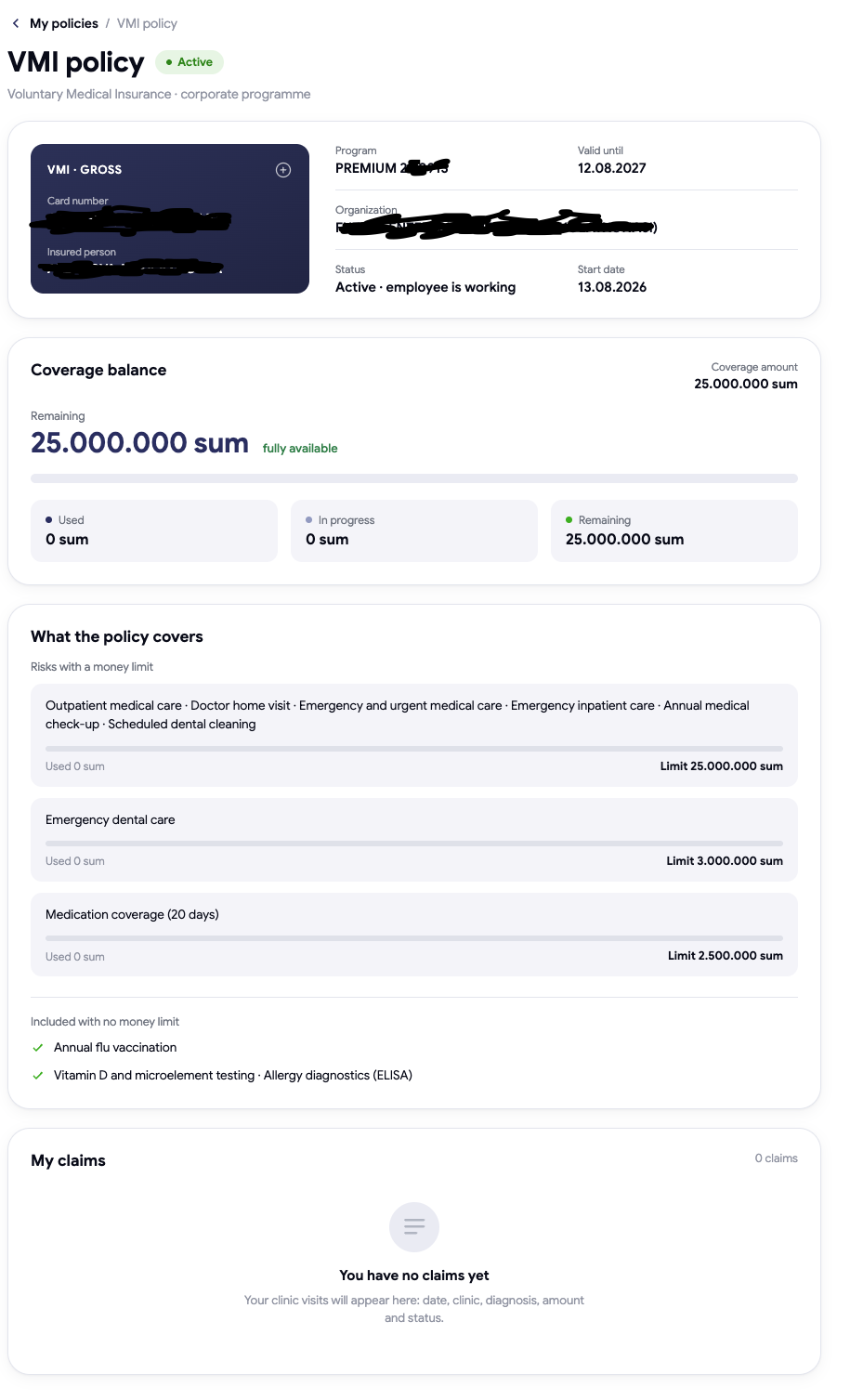
If your employer gives you medical insurance, you probably can't answer two simple questions: what does it actually pay for, and how much of it have I already used?
Most people find out by calling HR, or by not finding out at all — and discovering at the clinic reception that something wasn't covered. The day before, I had finished the part that fetches this information from the insurer. This post is about turning it into something a person can read.
The problem: the information existed, but nobody could see it
The insurer already knew everything — your card number, your program, your allowances, every clinic visit, every sum paid. It just lived in a system built for insurance staff, not for the person who is insured.
So the goal wasn't to invent data. It was to take a wall of raw records and turn it into one page that answers the questions people actually ask.
One page, four different lives
The tricky part is that not everyone is in the same situation, and the page has to handle all of them without ever looking broken:
- Someone who just joined — covered, but with no history yet. Showing an empty table here feels like an error, so it says plainly that there's nothing yet.
- Someone with a long history — needs their remaining balance first, and their visits below it.
- Someone who left the company — the cover has ended. That has to be obvious immediately, not hidden in small print.
- When the insurer's numbers are temporarily unavailable — the page still shows the card and what's covered, instead of showing nothing at all.
Every value on the page comes from the live response. Nothing is hardcoded — if the insurer changes a limit tomorrow, the page changes with it.
The trap: the numbers you must never add up
This one nearly slipped through. The data lists a total sum insured, and inside it several named allowances — dental, check-ups, medication, and so on.
The instinct is to add the named allowances together and show the total. That gives a bigger number, and a wrong one — in a real example, 30.5 million instead of 25 million. Those allowances aren't stacked on top of each other; they're carved out of the same pot.
There was a second version of the same trap in the "already used" figure. A claim that's still open is money set aside, not money spent. Counting it as spent made a person's remaining balance look 500,000 smaller than it really was.
Getting a money figure wrong on an insurance page isn't a cosmetic bug. People make decisions with that number.
Translating the words I didn't write
The page is in three languages. The catch: the names of the benefits arrive from the insurer in Russian only, so an Uzbek or English user would read a translated page with a block of Russian in the middle of it.
My first attempt matched individual words inside each phrase. It recognised barely a quarter of them and produced half-translated lines — worse than leaving them alone. So I switched to recognising each full phrase and mapping it to a concept, then showing the proper wording for that concept in whichever language the user is reading. That got almost all of them.
One phrase stayed untranslated on purpose — its Russian wording is genuinely ambiguous, and I'd rather show the original than confidently show a guess about what someone's insurance covers. The whole page is built to feel instant: while the data loads it shows a soft grey outline of the real layout, so nothing flashes or jumps around.
But the part I like most isn't technical. Someone can now open their phone and know, in about five seconds, what they're covered for and what's left — something that used to take a phone call and a person on the other end to look it up.