Rebuilding the personal cabinet: one place for every policy a customer owns
I rebuilt the logged-in area of an insurance website from the ground up — a multi-page "personal cabinet" where customers see every policy they hold across the whole company, verify their identity with the national ID system, and manage their cars, property and profile. It's live in production and I'm still adding to it.
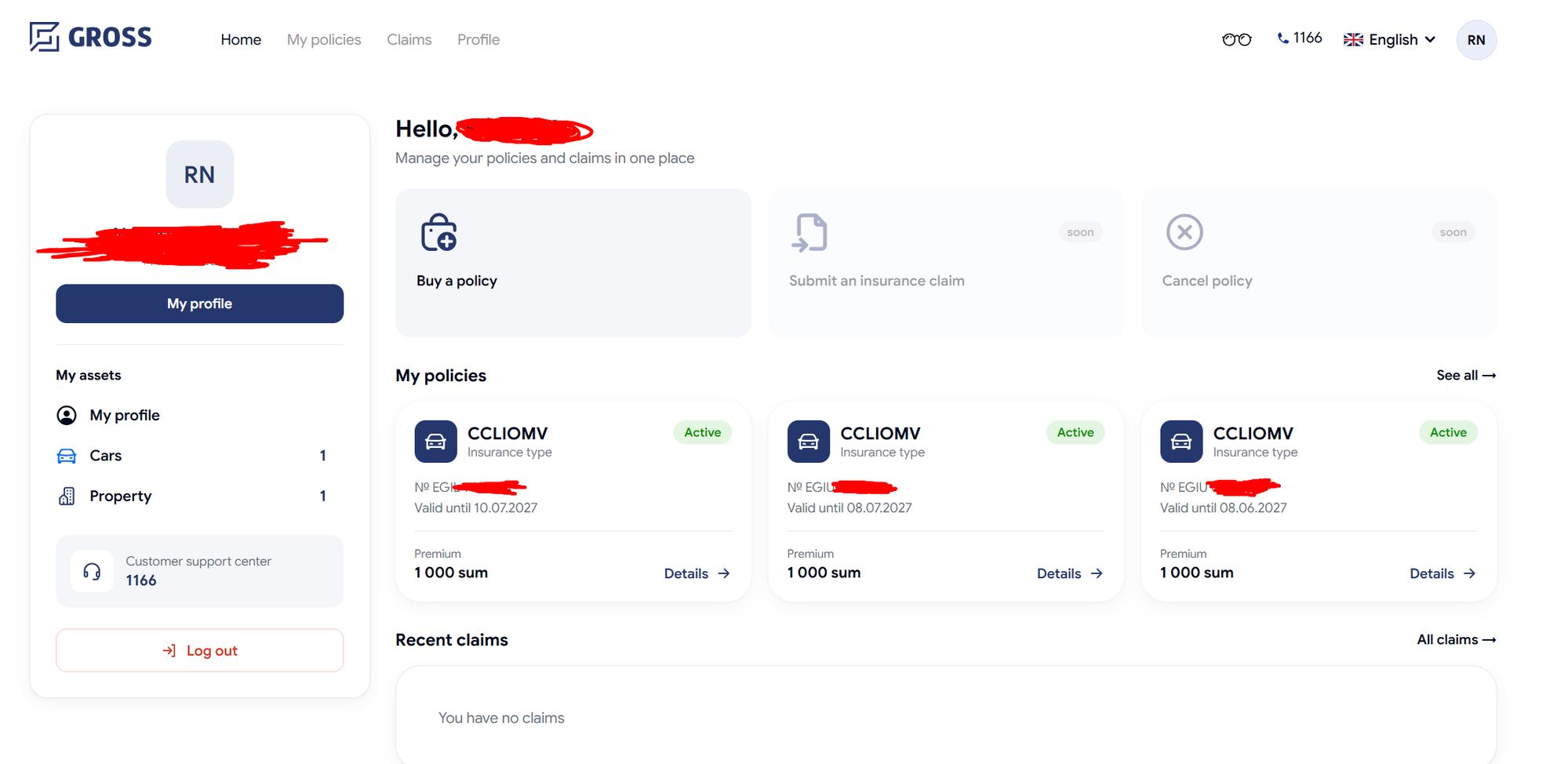
When you log in to an insurance website, the "my account" area is where trust is either won or lost.
It's where people check what they're covered for, prove who they are, and take action when somethin g goes wrong. I was given the job of rebuilding that entire area for Gross — a fresh, redesigned p ersonal cabinet — and shipping it to real customers. This is the story of what it does and the two hardest parts.
The problem with the old account area
The old logged-in area had a real gap: it only showed policies a customer had bought on the websit e itself. But people buy insurance in lots of ways — at a branch, through an agent, over the phone . All of those were invisible online. So a customer could log in, see two policies, and wrongly thin k that was everything they had.
On top of that, the design was dated and didn't match the company's newer look. The task was two thi ngs at once: make it show the truth, and make it look right.
What the new cabinet is
I built it as a set of connected pages, each doing one job well:
- Dashboard — a friendly landing screen: a greeting, a snapshot of your top policies, your most recent claims, and quick actions.
- My Policies — the heart of it: a searchable, filterable list of every policy you own, each sho wn as a clean card with its status, dates, and a link to the PDF.
- Claims — a list of your insurance cases, split into Active and Archive, each with a live count .
- Profile & Assets — a hub where you manage your personal data, change your password, and add or remove your cars and property.
The whole cabinet was redesigned to match the approved designs down to the details — a consistent na vy-blue look, rounded cards, and its own typeface (Google Sans) applied only inside the cabinet, so the account area feels like a polished, distinct space.
It also works properly on a phone: on a computer you get a top navigation bar and a sidebar, and on mobile that turns into a bottom tab bar and a stacked settings list — the layout people expect f rom an app.
The hard part #1: showing every policy, from everywhere
This is the change I'm most proud of. To show a customer all their policies — not just website pur chases — the cabinet now also pulls from the company's internal registry, which holds every cont ract a person has across every branch.
The tricky bit was doing this safely and reliably:
- Safety. The lookup is done by the customer's national ID number — but I made sure that number is read from their own verified profile on the server, never sent from the browser. That means n obody can look up someone else's policies by typing in a different ID. The secret key used to reach the internal system also stays on the server, out of the browser entirely.
- Two sources, one clean list. Website purchases and registry contracts are merged into a sing le list and de-duplicated, so the same policy never shows up twice. Website purchases win when the re's an overlap, because they carry richer details and the real PDF.
- It never breaks the page. If the internal registry is down, the customer still sees their we bsite policies — an error only appears if both sources fail at once. A back-end problem should nev er leave someone staring at a blank account.
I also had to translate the registry's raw data into something friendly — mapping internal product c odes to real insurance names and icons, sorting out inconsistent field names, and showing the right status on each card.
A subtle bug worth telling
The first version couldn't talk to the internal system at all — it kept getting rejected. The cause was a genuinely sneaky one: the same internal server hosts two doors, and they expect the security k ey formatted differently — one wants it plain, the neighbouring one wants a "Bearer" prefix. I'd followed the pattern of the existing, working code, which used the plain format — but this new door needed the prefix. I switched to the same proven, robust setup the rest of the system uses, made th e key handling foolproof, and got it reading the server's real error messages instead of a generic f ailure. Verified against the live system: plain key → rejected, prefixed key → success.
The hard part #2: proving who you are, with the national ID system
Some actions in an insurance account are sensitive — cancelling a policy and getting a refund, for e xample. For those, "logged in" isn't enough; you need to prove you're really you.
So the cabinet integrates MyID, Uzbekistan's official digital identity system. The customer veri fies themselves with a real biometric check tied to their national ID, and I built three ways to do it so it's smooth on any device:
- Scan a QR on your computer with the official MyID app on your phone.
- Use your device's camera directly, no phone needed.
- Start on your computer, finish on your phone — the computer shows a code, you scan it with yo ur phone, do the check there, and the computer updates itself the moment it's done.
Once verified, a green "Verified" badge appears, and sensitive flows like cancelling a policy are un locked. Getting this right meant handling the fiddly reality of identity systems — secure pop-ups, w aiting for a result from another device, and clear "confirming… / verified / try again" states so th e user is never left guessing.
Where it stands, and what's next
The core of the cabinet is live in production today: the dashboard, the full "My Policies" list with all-branch contracts, claims, the profile with cars and property, password changes, and MyID ve rification.
Some parts are deliberately still in progress and marked as such in the app — the buy-a-policy and p ayment screens (built as designs, waiting on their back-end), the standalone claim submission, and t he final refund step of policy cancellation. I'm continuing to build these out and refine the live p ages as I go.
The biggest lesson: an "account page" isn't a screen, it's a promise — that what a customer sees i s complete, correct, and safely theirs. Most of the work was making that promise true.